The check-in
Stage 1Hi [Name], it's [You] from [Company]. Just checking you received the quote for [job] and seeing if you have any questions.
A five-step follow-up routine, four short messages you can send today, and a spreadsheet you can build in five minutes. Free, and nothing to buy.
You sent the estimate, the homeowner said they would think about it, and then nothing. A roofing quote is a big number, and a quiet one is easy to lose track of among new calls and jobs in progress. This page gives you a simple routine for following up, short messages you can adapt, and a way to decide which open quotes deserve your next call.
Common reasons are ordinary ones. Sometimes nobody has decided "no"; the quote has just stopped being anyone's next action.
That is the part you control: whether there is a next step on your side, with a date.
Use the date you last contacted the customer, not the date you sent the quote, and add one step each time. Adjust the waits to how fast your customers usually decide.
About 3 days after sending: a quick check-in. Confirm they received it and ask if they have questions.
About 4 days later: add something useful. A realistic start date, the warranty, or a financing option you offer.
About a week later: address the likely objection. Offer to walk through what is in the quote so they can compare bids like for like.
About 10 days later: offer a clear next step. For example, a start date if they confirm by a certain day.
About 2 weeks later: a friendly close-out. Say you will close the quote for now and that they can reply any time.
Chasing the same quote forever costs you time you could spend on quotes that are still warm. The day numbers add up the waits above, counted from the day you sent the quote, if every follow-up happens on schedule.
Keep it short, polite and specific. Replace the brackets with your details.
Swipe sideways to see all four messages
Hi [Name], it's [You] from [Company]. Just checking you received the quote for [job] and seeing if you have any questions.
Hi [Name], one thing I should have mentioned on the [job] quote: [start date / warranty / financing option].
Hi [Name], I can start the [job] on [date] if we confirm by [day]. Shall I send the agreement?
Hi [Name], I don't want to keep bothering you, so I'll close the [job] quote for now. If plans change, just reply and I'll pick it back up.
Only contact people who have asked for a quote from you, follow the rules where you work, and stop if asked.
When you have many open quotes, chasing them in the order they sit in your inbox is not a plan. A sensible order uses four things you already know.
If you contacted them yesterday, wait. If it has been past your routine's wait, they come first.
A larger job is worth a call before a small one.
Very old quotes are unlikely to still be live; recent ones are warmer.
After several attempts, the next one is more likely to be the last.
Doing this by hand across thirty quotes is tedious, which is why most people skip it. A spreadsheet with a formula for "due today" and a sort by value fixes most of it. The ordering above is a sensible starting rule, not a measured fact, and it does not predict which quotes you will win.
You do not need to buy anything to run this routine.
Make a spreadsheet with these columns, one row per quote. Use a quote ID that matches the quote in your existing records (your invoicing software, email or phone contacts), so when a row shows DUE you can look up that customer's contact details there. You do not need to keep names or phone numbers in this sheet.
Column A is a quote ID you choose, B the date sent, C the amount, D the status (type Open, Won or Lost), E the date of your last follow-up (leave empty until you have followed up) and F how many follow-ups you have made so far. Columns G and H are the two formulas below.
| AQuote ID | BDate sent | CAmount | DStatus | ELast follow-up | FFollow-ups made | GNext follow-up | HDue? |
|---|---|---|---|---|---|---|---|
| Q-1041 | date | 11800 | Open | empty until you follow up | 0 | formula | formula |
Column G shows the date the next follow-up is due, using the waits from the routine above (3, 4, 7, 10 and 14 days). Column H shows DUE when that date has arrived.
=IF(D2<>"Open","",IF(F2>=5,"Close out",IF(E2="",B2,E2)+CHOOSE(F2+1,3,4,7,10,14)))=IF(AND(D2="Open",ISNUMBER(G2),G2<=TODAY()),"DUE","")Format columns B, E and G as dates. These two formulas were checked in desktop Microsoft Excel for Windows on five sample quotes; they have not been tested in Google Sheets or other apps.
Four habits keep the sheet useful.
I sell a ready-made Excel version of this tracker as a digital download. You do not need it to use anything on this page.

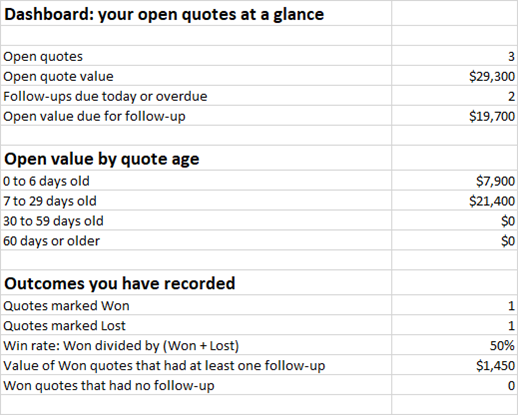
$14.99digital download on Etsy
What to know before you buy. It was tested in desktop Microsoft Excel for Windows only. It has not been tested in Google Sheets, Excel for the web or Excel for Mac. It does not send messages for you.
It is a record-keeping and prioritizing aid; results depend on how you use it.
Opens the listing on Etsy. I sell this product and publish this guide.